
Summary for Decision-Makers
Legacy systems become slower to change, more expensive to support, and increasingly dependent on specialist knowledge.
Legacy system modernization services help enterprises address these constraints through structured assessment, clear ownership, phased execution, and measurable outcomes. The appropriate strategy may be to retain, retire, rehost, replatform, refactor, rebuild, or replace an application.
When a Working System Becomes a Business Constraint
A legacy application can remain operational long after it stops supporting the business effectively. It may still manage orders, customer records, finance, or approvals, yet changes take weeks, integrations are difficult, and security updates become risky.
Enterprises often continue applying short-term fixes because changing a critical platform appears more dangerous than maintaining it. Each fix may resolve an immediate issue while adding complexity and making the next change harder. This is the technical debt trap.
Modernization combines assessment, migration planning, engineering, testing, and support to reduce these constraints while protecting continuity.
What Are Legacy System Modernization Services?
Legacy system modernization services transform outdated applications, infrastructure, databases, and integrations so they can meet current business, security, and operational requirements.
Age alone does not define a legacy system. Even a newer platform can become legacy if it is tightly coupled, poorly tested, difficult to integrate, or dependent on unsupported components.
Modernization may include:
- Application and infrastructure assessment
- Code and architecture review
- Cloud readiness assessment and workload migration
- Application refactoring or redevelopment
- Database modernization
- API and system integration
- User interface and workflow improvements
- Automated testing
- Security and compliance upgrades
- Monitoring and ongoing support
Modernization vs. Maintenance and Replacement
Maintenance keeps the current system stable through defect resolution, monitoring, updates, performance tuning, and minor enhancements.
Modernization changes the technical or operational foundation by reducing coupling, replacing obsolete components, restructuring data, automating deployment, or redesigning workflows.
Replacement moves the process to a different product, platform, or newly built application. These approaches may form different stages of the same long-term technology roadmap.
How Legacy Systems Create a Technical Debt Trap
Technical debt is the future cost created by faster or narrower decisions made today. The original choice may have been reasonable, but problems begin when temporary compromises become permanent architecture.
Features are added quickly, upgrades are postponed, documentation falls behind, and knowledge becomes concentrated in a few people.
Over time, the application develops familiar symptoms:
- Business rules are duplicated across modules.
- Integrations depend on point-to-point connections.
- Releases require extensive manual regression testing.
- Unsupported frameworks cannot be upgraded safely.
- Monitoring and production logs are incomplete.
- Deployment depends on individual knowledge.
- Users rely on spreadsheets and email to complete workflows.
Together, these workarounds make small changes difficult to estimate and risky to release.
The financial impact can be material. McKinsey reports that companies may pay an additional 10 to 20 percent on top of project costs to address technical debt. In the same research, 30 percent of surveyed CIOs said that more than 20 percent of technology budgets nominally dedicated to new products was being diverted to technical-debt issues.
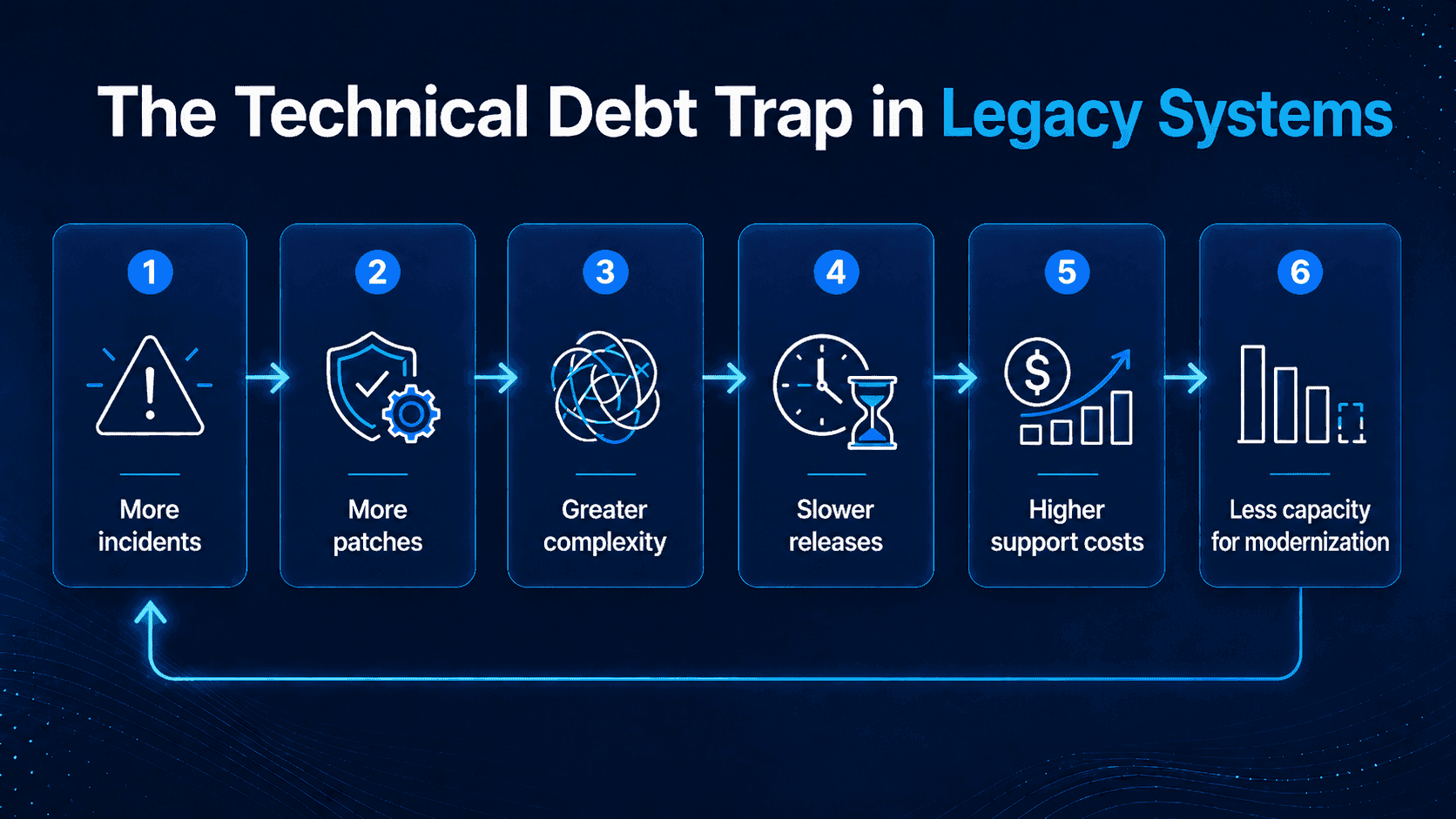
Modernization is often delayed because leaders fear downtime, data loss, disruption, compliance exposure, or uncontrolled costs. The resulting cycle is predictable:
More incidents → more patches → greater complexity → slower releases → higher support costs → less capacity for modernization
Breaking this cycle requires protected capacity, clear ownership, and a roadmap linked to business outcomes.
Signs Your Business Needs Legacy System Modernization
Not every older application needs immediate change. However, several signals indicate that it should be assessed.
Maintenance Costs Keep Rising
Support spending rises without improving availability, performance, or user satisfaction. Hidden costs include specialist contractors, incident handling, manual reconciliation, delayed releases, and employee workarounds.
New Features Take Too Long to Release
Small changes affect multiple modules and integrations, while teams avoid core logic because regression risk is high. When the cost of change becomes disproportionate to its value, the architecture is limiting the business.
Integration Is Becoming Difficult
The application lacks reliable APIs or requires direct database access, making every CRM, analytics, mobile, AI, or partner integration a separate project.
Security and Compliance Risks Are Growing
Unsupported components are difficult to patch, while older applications may lack granular access controls, audit trails, encryption, or centralized logging.
The Business Depends on a Few Specialists
Only a small number of people understand the code, deployment process, or business rules. This creates key-person risk and makes recruitment, handover, and incident response more difficult.
Performance and User Experience Limit Growth
The system slows during peak periods, cannot scale efficiently, or forces employees to repeat tasks manually.
The Business Cost of Delaying Modernization
The modernization case should focus on cost, speed, and risk, not only code quality.
Higher Operating Costs
Legacy platforms create recurring expenses through specialist support, inefficient infrastructure, manual processes, extended testing, and complex incident resolution.
The business case should include both technology spending and the operational cost of workarounds.
Slower Time to Market
New products, digital channels, and partner integrations often depend on core systems. When those systems are difficult to change, business initiatives wait.
Greater Operational and Security Risk
As a system becomes harder to understand, changes become harder to predict. Teams may avoid updates, leaving obsolete components and weak controls in place.
Lower Productivity and Limited Innovation
Employees spend time reconciling data, repeating tasks, and correcting errors. Fragmented data also limits analytics, automation, and AI.
Seven Common Legacy Modernization Strategies
There is no single correct strategy. Most enterprise portfolios require a combination.
Strategy | What It Means | Best Suited For | Main Limitation |
Retain | Keep the system and monitor it | Stable applications within defined risk tolerance | Existing constraints remain |
Retire | Decommission the application and archive or migrate required data | Low-value, redundant, or obsolete systems | Requires dependency and data-retention planning |
Rehost | Move to new infrastructure with minimal code change | Data center exit or rapid infrastructure renewal | Limited application improvement |
Replatform | Change selected platform components | Improving deployment, database, or scalability | Some architectural debt remains |
Refactor | Restructure code or architecture | Valuable systems limited by maintainability | Requires deeper engineering |
Rebuild | Create a new application around current requirements | Valuable processes with unsuitable technology | Higher cost and migration risk |
Replace | Move to a commercial product or SaaS | Standard capabilities with low differentiation | Process fit and vendor dependency |
Retain
Retain a system when it remains stable, maintainable, and within the organization’s defined security, compliance, and operational risk tolerance. Set conditions for future reassessment.
Retire
Retire applications that no longer deliver sufficient business value, duplicate capabilities available elsewhere, or create more cost and risk than their continued operation can justify.
Retirement still requires dependency removal, data archiving or migration, retention planning, and an alternative user process.
Rehost
Rehosting moves an application to new infrastructure with minimal code change. It can support a rapid data center exit, but it does not remove most code-level technical debt.
Replatform
Replatforming updates selected components while preserving the main architecture, such as adopting a managed database, containers, or automated deployment.
Refactor
Refactoring improves internal structure while preserving valuable business behavior. It may separate modules, remove duplicated logic, improve testability, or expose APIs.
Rebuild
Rebuilding creates a new application around current requirements. It should remove obsolete functions instead of reproducing every legacy feature.
Replace
Replacement moves the process to a product or SaaS platform. It may suit standardized capabilities, but process fit, integration, data ownership, compliance, and licensing still matter.
For a broader build-versus-buy perspective, see Titani’s guide to off-the-shelf vs. custom software.
How to Choose the Right Modernization Approach
The decision should combine business value, technical health, risk, and feasibility.
Evaluate Business Value
Identify the revenue, customer, and operational processes that depend on the system. Determine whether its logic differentiates the company and whether a standard platform could meet the same need.
Assess Technical Health
Review architecture, code quality, dependencies, security, performance, test coverage, deployment, monitoring, documentation, and ownership. Consider both current weaknesses and the future cost of change.
Understand Data and Integration Complexity
Identify authoritative data sources, downstream dependencies, real-time interfaces, retention requirements, and data quality problems. Migration sequencing must influence the decision.
Balance Value Against Risk
A simple portfolio matrix can guide prioritization:
- High value, low risk: Prioritize.
- High value, high risk: Modernize in controlled phases.
- Low value, high risk: Replace, consolidate, or retire.
- Low value, low risk: Retain and monitor.
Invest where change creates the strongest combination of business value and risk reduction.
Governance and Ownership: A Prerequisite for Modernization
Modernization needs named decision-makers, not only technical contributors.
An executive sponsor should own the business outcome and investment, while an application or product owner represents user needs. Architecture leadership guides technical direction, and data, security, and operations owners approve controls within their areas of responsibility.
A steering group should resolve major choices such as whether to retain, refactor, replace, or retire an application. The delivery lead must reserve modernization capacity in the roadmap and sprint plan. Without funded capacity and decision authority, technical-debt work is displaced by short-term feature requests.
A Phased Enterprise Legacy Modernization Roadmap
Divide the program into measurable stages.
Phase 1: Discover and Assess
Inventory applications, infrastructure, databases, integrations, users, and owners. Document business criticality, operating costs, incidents, security gaps, planned initiatives, and technical unknowns.
Outputs should include dependency maps, technical health findings, a cost baseline, and modernization options.
Phase 2: Prioritize Systems and Modules
Rank candidates by business criticality, customer impact, maintenance cost, security exposure, change demand, integration constraints, and feasibility.
A pilot should be manageable but valuable enough to test the business case.
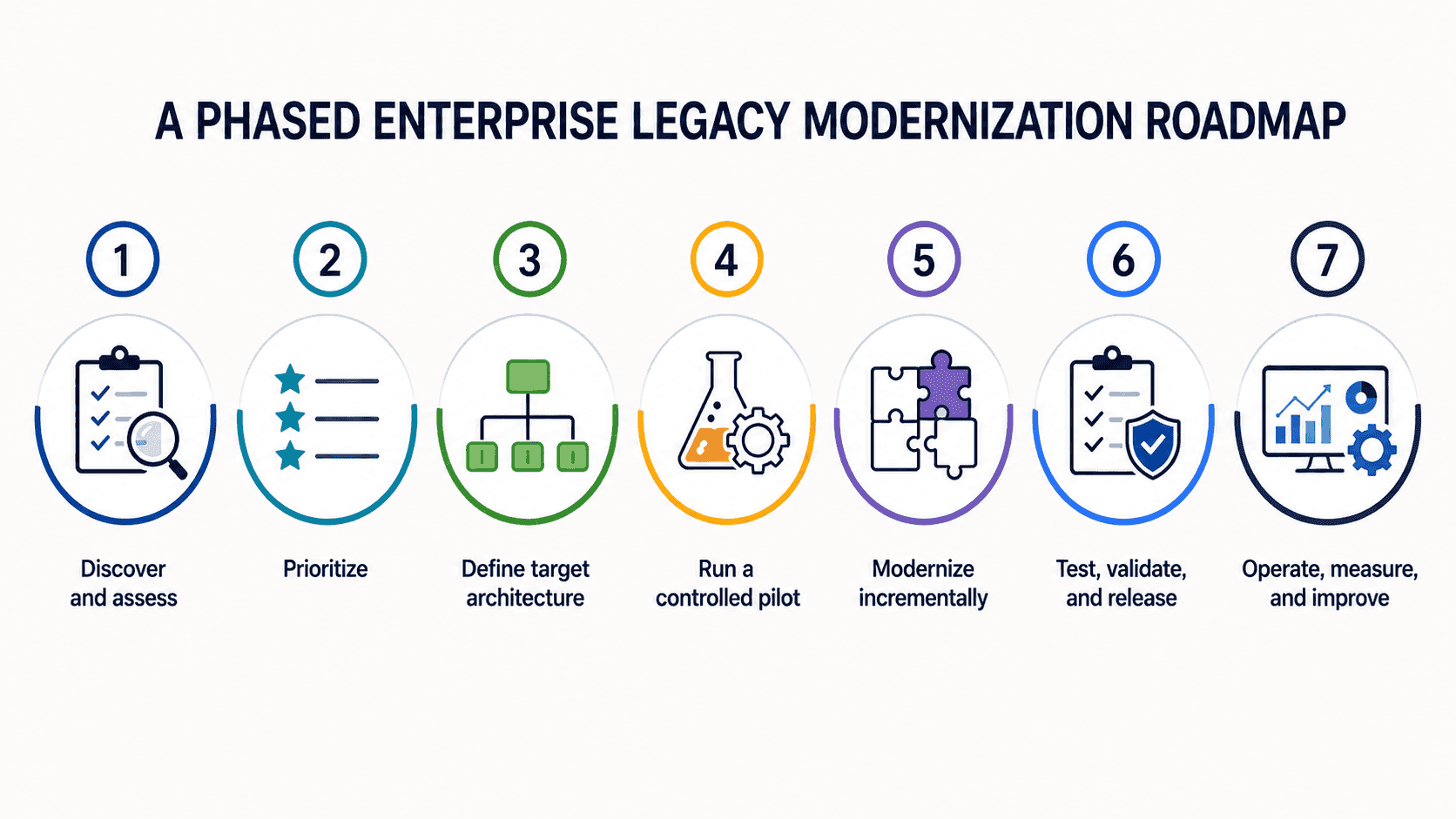
Phase 3: Define the Target Architecture
Define how the target environment will support security, data, integration, deployment, monitoring, scalability, and recovery.
Decisions may include deployment model, application structure, API strategy, database ownership, identity management, logging, and release procedures.
Microservices should not be the default when a modular application would be simpler to build and operate.
Phase 4: Run a Controlled Pilot
Choose a workflow or module with clear pain, measurable outcomes, and controlled dependencies.
Use the pilot to validate architecture, migration tools, integrations, testing, adoption, and cost assumptions. Define exit criteria in advance.
Phase 5: Modernize Incrementally
New capabilities can operate beside the legacy system while functions move module by module, workflow by workflow, or by business unit.
Possible approaches include:
- Module-by-module replacement
- Workflow-by-workflow migration
- API enablement
- Parallel data synchronization
- Regional or business-unit rollout
What Incremental Modernization Can Look Like
For example, a logistics company may keep its legacy order-processing core running while introducing an API layer and rebuilding customer tracking as a separate module. Automated regression tests confirm that pricing and invoicing remain consistent as workflows move gradually. Once the new components operate reliably, outdated reporting can be retired and historical data archived.
Phase 6: Test, Validate, and Release
Testing should cover:
- Functional and regression testing
- API and integration testing
- Data migration reconciliation
- Performance and load testing
- Security testing
- User acceptance testing
- Production readiness and observability validation
- Rollback procedures
Automated regression testing is especially valuable while old and new components coexist.
Phase 7: Operate, Measure, and Improve
Go-live begins the operating phase. Monitor availability, latency, errors, transactions, costs, and user behavior. Define incident ownership, update documentation, and transfer knowledge to the operating team.
A strong maintenance and support model protects the modernization investment through proactive monitoring, updates, issue resolution, and performance optimization.
How to Modernize Without Disrupting Operations
Business continuity should be designed into the program.
Avoid a Big-Bang Cutover
Replacing a critical system in one release concentrates technical, data, and operational risk. Incremental delivery creates smaller failure domains.
Run Old and New Capabilities in Parallel
For high-risk workflows, parallel operation confirms that the new system produces accurate results. Define its duration and exit criteria in advance.
Build Rollback into Each Release
Every deployment should define rollback triggers, decision authority, data handling, integration recovery, and user communication.
Involve Business Users Early
Business teams should validate requirements, prioritize workflows, and test outcomes so inefficient processes are not reproduced in newer technology.
Treat Data Migration as a Separate Workstream
Profile data early for duplicates, incomplete records, incompatible formats, ownership issues, and retention needs. Not every historical record must move into the new operational database.
Measuring the ROI of Legacy System Modernization
Modernization ROI should be based on observable outcomes.
Establish a Baseline
Measure the current state before implementation:
- Support and infrastructure costs
- Incident volume and recovery time
- Release frequency and lead time
- Regression testing effort
- Application performance
- Manual processing hours
- Data reconciliation effort
- User satisfaction
- Revenue or transactions affected by system constraints
Track Operational and Business Outcomes
Useful indicators include reduced downtime, faster recovery, lower infrastructure costs, shorter lead time, faster testing, less specialist dependency, and faster partner integration.
A simple view is:
Modernization value = operating savings + avoided future cost and risk + business value enabled
Use Industry Results as Context, Not a Promise
Measured outcomes provide useful context, but results depend on workload, tools, architecture, and delivery model.
In an AWS case study, Thomson Reuters reported a fourfold increase in .NET modernization velocity, while moving workloads from Windows to Linux reduced costs by 30 percent. These results provide useful context, but they should not be treated as a universal benchmark for every legacy estate.
Each program should define its own baseline, target, measurement period, and owner.
What to Look for in a Legacy System Modernization Partner
A modernization partner must manage architecture, data, testing, and operations together.
Look for:
- Experience across legacy and modern technologies
- A business-first assessment process
- Strong API, integration, and data migration capabilities
- Automated testing and risk management
- Security, governance, and IP protection
- Clear knowledge transfer and operational ownership
- Ongoing maintenance and support after go-live
The partner should justify why each component should be retained, moved, refactored, rebuilt, replaced, or retired. A complete rebuild should not be the default recommendation.
How Titani Supports Legacy System Modernization
Titani approaches legacy modernization as a controlled business and engineering program supported by established security, quality, and software delivery practices.
As an ISO 27001:2022-certified technology partner, Titani applies structured information security controls to help protect client data, source code, intellectual property, and sensitive system access throughout the modernization lifecycle. Our delivery approach also incorporates CMMI Level 3 best practices and Agile methodologies to support disciplined planning, incremental implementation, quality control, and predictable project outcomes.
The process begins with application assessment and dependency mapping, followed by modernization option analysis based on business value, technical health, data complexity, security requirements, and operational risk. A controlled pilot can then validate the target architecture, migration approach, testing coverage, rollback procedures, and cost assumptions before broader implementation.
Depending on the application, Titani can support refactoring, redevelopment, API integration, data migration, cloud readiness assessment, workload migration, cloud platform improvements, automated regression testing, deployment, and ongoing monitoring.
Our role is not limited to delivering replacement code. We help establish the assessment evidence, migration controls, testing coverage, knowledge transfer, operational ownership, and support model required to modernize a critical application safely.
Titani’s custom software development services, cloud services, and maintenance and support services can be combined around the specific needs of each application.
Conclusion: Turn Technical Debt into a Managed Investment
Effective modernization begins with evidence: which systems constrain growth, which risks require action, and which investments can deliver measurable value.
By mapping dependencies, establishing clear decision ownership, validating the approach through a controlled pilot, and scaling in phases, enterprises can reduce technical debt while protecting business continuity.
To assess a critical application and identify a practical modernization path, contact Titani.
Frequently Asked Questions About Legacy System Modernization Services
What Are Legacy System Modernization Services?
They assess and transform outdated applications, infrastructure, databases, and integrations through approaches such as rehosting, replatforming, refactoring, rebuilding, migration, testing, and support.
When Should a Company Modernize a Legacy System?
Assess modernization when costs rise, releases slow down, integrations become difficult, security updates can no longer be applied reliably, performance limits growth, or the system depends on a few specialists.
Is It Better to Refactor, Rebuild, Replace, or Retire?
Refactor when valuable business logic is limited by the architecture. Rebuild when the technology and experience no longer meet requirements. Replace standardized capabilities that do not create differentiation. Retire applications that are redundant, obsolete, or no longer justify their cost and risk.
Can Legacy Systems Be Modernized Without Downtime?
Many systems can be modernized with limited disruption through phased migration, parallel operation, APIs, automated testing, and controlled cutovers. Downtime depends on architecture, data, integrations, and continuity requirements.
How Long Does Legacy System Modernization Take?
There is no standard timeline, but three planning levels can help enterprises frame the investment:
- Assessment: Often several weeks to inventory the system, map dependencies, evaluate technical health, and define options.
- Pilot or contained application scope: Often several months to modernize a controlled module or workflow and validate architecture, testing, migration, and operational readiness.
- Portfolio program: Commonly delivered in prioritized waves over multiple years when many business-critical applications, integrations, and data domains are involved.
These are indicative planning ranges, not delivery commitments. The actual schedule depends on scope, code quality, dependencies, data complexity, compliance, testing coverage, team capacity, and the selected strategy.
Does Moving a Legacy Application to the Cloud Complete Modernization?
Not necessarily. Cloud migration can improve hosting flexibility without resolving tightly coupled code, weak testing, obsolete interfaces, poor data quality, or inefficient workflows.